Algorithm
Core Idea
An algorithm is a plan — a set of step-by-step instructions with a clear starting point, a clear finishing point, and a set of unambiguous instructions in between. Every instruction is carried out in a fixed order. If you can tie your shoes, follow a recipe, or get dressed, you already know how to follow an algorithm.
Algorithms are not just computer programs. They appear anywhere a process needs to be repeatable and reliable. But when an algorithm runs inside a computer, the quality of the input determines the quality of the output. The phrase for this is: "Garbage in, garbage out." A perfect algorithm applied to bad data still produces a bad result.
How an Algorithm Works
- Start — there is exactly one entry point.
- Process — each step carries out an action, takes an input, or makes a decision.
- Decision — at a fork, a condition is tested; the answer sends the flow down one path.
- End — there is a clearly defined stopping point.
An algorithm must be:
- Unambiguous — every instruction can mean only one thing.
- Finite — it must eventually stop.
- Effective — each step is actionable and within the system's capability.
Two Ways to Write an Algorithm
1. Pseudocode
Pseudocode is not a programming language. It is a plain-language description of each step written line by line, close enough to code to be translated later but readable without knowing any specific language.
Conventions: KEYWORDS in uppercase, variables in lowercase, messages in sentence case.
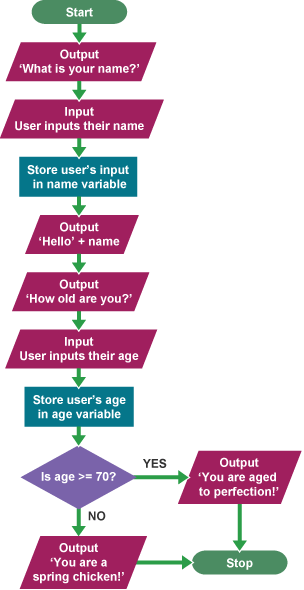
OUTPUT 'What is your name?'
INPUT user inputs their name
STORE the user's input in the name variable
OUTPUT 'Hello' + name
OUTPUT 'How old are you?'
INPUT user inputs their age
STORE the user's input in the age variable
IF age >= 70 THEN
    OUTPUT 'You are aged to perfection!'
ELSE
    OUTPUT 'You are a spring chicken!'
2. Flow Diagram (Flowchart)
A flowchart uses standard shapes to show the same algorithm visually. Each shape has a name and a specific job:
Flowchart Shapes Reference
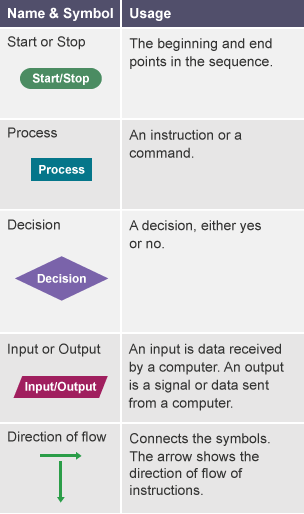
| Shape | Name | What it means | When to use |
|---|---|---|---|
| Oval (rounded ends) | Terminal / Start-End | Marks where the algorithm begins or finishes | First and last box in any flowchart |
| Rectangle | Process / Action | A step that does something — calculates, stores, changes a value | Any action that is not a question |
| Diamond | Decision | A yes/no question that splits the flow into two paths | Every IF condition |
| Parallelogram | Input / Output | Data coming in from a user (Input) or a message sent out (Output) | Asking for data, printing a result |
| Arrow | Flow line | Shows the direction the algorithm moves | Between every pair of shapes |
In Indonesian: Oval = Terminal (Mulai/Selesai), Kotak = Proses, Belah Ketupat = Keputusan, Jajar Genjang = Input/Output, Panah = Arah alur
Flowchart: Name and Age Example
Real-World Algorithms
Algorithms exist far outside computers. Six everyday examples:
Sorting papers — a teacher sorting papers by first name is executing a sorting algorithm (similar to a bucket sort: look only at the first letter to remove irrelevant information and make the task efficient).
Facial recognition — when you recognize a face, your brain draws on stored data about facial features and runs a matching algorithm. The same process, automated for computers, powers phone unlock and security systems — though these algorithms can be biased against certain groups if the training data was not diverse.
Google search — a Google search runs an algorithm that does not need the full question. Searching "swimming elephant" returns the same relevant results as "can an elephant swim?" — the algorithm strips noise and matches the core query.
Following a recipe — a recipe is a step-by-step algorithm for a repeatable outcome. Instead of trial and error, you use a known-good sequence from someone who has already debugged it.
Traffic lights — most traffic lights do not simply cycle on a fixed timer. Sensors in the road detect traffic flow, and an algorithm adjusts signal timing based on that input. The algorithm's job is to minimize total wait time across all lanes.
Bus scheduling — mapping efficient bus routes across a city with hundreds of stops is a classic hard problem in computer science called the Traveling Salesman Problem. Algorithms automate the calculation that would be impossible to do manually at that scale.
Connections to the Wiki
- computational-thinking — Algorithmic thinking is one of the four core elements of CT. An algorithm is the output of the CT process: after decomposing the problem, recognizing patterns, and abstracting away noise, you write the algorithm that solves it.
- evaluation — Evaluation is the checking stage that follows algorithm design. Before programming, an algorithm should be dry-run: trace it on paper with representative inputs to verify every path produces the correct output. The name/age algorithm (ages 15 and 75) is the BBC's worked dry-run example.
- decomposition — Decomposition breaks the problem into sub-problems. Algorithms are written for each sub-problem, then assembled. The algorithm is the recombination step.
- abstraction — An algorithm that solves too many cases is overcomplicated. Abstraction strips irrelevant detail before the algorithm is written, keeping the steps clean.
- pattern-recognition — Once a pattern is found in a problem, the algorithm can be generalized and reused across all instances of that pattern.
- pseudocode — Pseudocode is the natural first draft of an algorithm: human-readable, language-independent, translatable.
- agentic-coding-workflows — Directing an AI coding agent is an exercise in writing clear algorithmic instructions: decompose the task, define the steps, specify the conditions.