Apple Developer Academy Prep: Computational Thinking
Apple Developer Academy Prep: Computational Thinking
The mistake people make with this section is treating it as vocabulary study — learning the names of four things (decomposition, pattern recognition, abstraction, algorithms) so they can define them in an interview. That is the minimum. The real value is structural:
Computational thinking gives you a reusable operating model for converting any complex problem into a concrete, checkable solution. It also happens to describe, almost exactly, how the programs you will write at the Academy actually work inside.
This synthesis goes one section at a time through the ADA curriculum's CT cluster (3.1–3.6). It is the deep-mechanics companion to apple-developer-academy-prep-learning-and-thinking, which positions CT as one layer of a broader problem-solving and learning stance. If that page asks "how do you survive a fast-moving learning environment," this page asks "how do you actually break a problem down and turn it into a working solution."
3.1 What Is Computational Thinking?
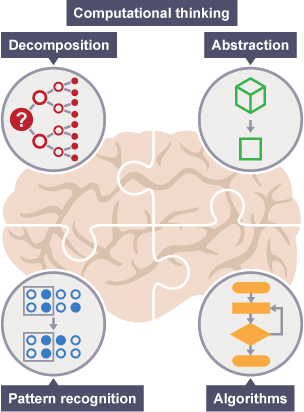
Computational thinking is often described as "thinking like a computer." That framing is wrong and the BBC source is precise in correcting it: computers do not and cannot think. CT is a human skill for structuring solutions that computers (or humans) can then execute.
The four cornerstones — decomposition, pattern recognition, abstraction, and algorithmic thinking — are co-equal. The BBC uses a deliberate analogy: they are like the four legs of a table. Remove one and the table collapses. That metaphor matters because the four moves are usually applied in concert, not in a single rigid sequence. In practice the BBC CT intro describes a working sequence (decompose, abstract, recognize patterns, construct algorithm), but the sequence is a common path, not a law. Problems require different emphases, and good CT practitioners move between the four as the work demands.
The sharper distinction from the sources is between CT and programming. Planning your route before leaving the house is like CT. Following the turn-by-turn directions is like programming. CT decides what to tell the computer. Programming tells the computer how to do it. This distinction matters at the Academy because the hard problems are not "how do I write this code" — they are "what should the code actually do." If you cannot think computationally before you open a code editor, the code you eventually write is a guess dressed up in syntax.
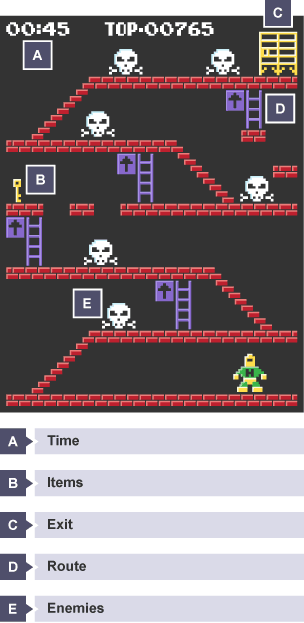
The videogame example from the BBC makes the point cleanly: before creating a game level, you must answer — what items exist and where, what the exit route is, what enemies exist and where their weak points are, what the constraints are. Those questions must be resolved before the first line of code is written. CT is the work that happens in the design space before programming begins.
3.2 Abstraction
Abstraction is often introduced as "removing unnecessary detail." That is correct but undersells it. The BBC framing adds the critical word: the result is a model.
A model is a general idea of the problem that represents all instances, not just the specific one in front of you. Once you have a model, the solution you design works for any instance — not only the case you happened to study.
The cats example carries this well. All cats share eyes, a tail, and fur — those are the general characteristics. Specific characteristics (fur color, tail length, eye color) vary per cat. If you build your "draw a cat" algorithm from the specific cat you observed, it fails for every other cat. If you abstract to the general model, it works for all cats.
The stakes for software are the same. An app that solves this specific user's exact situation often fails for the next user. Abstraction is the move that makes your solution general enough to be useful at scale while still specific enough to be useful at all. That balance — not too abstract, not too specific — is one of the hardest judgment calls in software design.
understanding-abstraction-everyday-examples adds the "interface and implementation" framing: a good abstraction exposes only what the user needs to interact with and hides everything else. Pressing the "on" button of a coffee maker is the interface; the pump, heater, and drip mechanism are the implementation. Clean interfaces make systems usable. Leaky abstractions — when implementation details bleed through — create the kind of brittle software that breaks every time someone changes something behind the wall.
3.3 Decomposition
Decomposition is usually the first move in practice — and the one most people skip when time pressure shows up.
A complex problem resists direct attack. You cannot solve "build an app" any more than you can solve "who committed this crime?" in one thought. The BBC crime scene example shows what decomposition actually looks like when applied honestly: not one question but a list of independent sub-questions, each answerable on its own — what crime occurred, when, where, what evidence exists, whether there were witnesses, whether similar crimes happened recently.
The BBC app-creation example makes the ADA relevance explicit. A first-time app developer decomposes into: what kind of app, what it looks like, target audience, graphics, audio, software to build it, user navigation, testing method, and distribution channel. That decomposition also makes division of labor visible — a friend handles graphics, another handles testing. Decomposition does not only make problems smaller; it makes collaboration structurally possible.
The failure mode worth knowing: decomposition can be done at the wrong grain size. Too coarse, and you still face problems too big to handle. Too fine, and you drown in a list that generates more coordination cost than the pieces save. The test is: can each piece be examined and solved independently? If sub-problems still depend on each other in ways that cannot be controlled, the decomposition is not finished.
5-whys is decomposition applied recursively to root-cause analysis. Each "why" takes a symptom and decomposes it into its upstream cause. The causal chain is just a depth-first decomposition of a failure.
3.4 Pattern Recognition
If decomposition breaks the problem into pieces, pattern recognition is what lets you avoid solving each piece from scratch.
Pattern recognition means noticing that a sub-problem you are looking at is structurally the same as one you (or someone else) has already solved. The QCAA video's four diagnostic questions make the habit operational:
- Are there any patterns you observe?
- Does this resemble a problem you've already solved?
- Do any of the sub-problems share qualities with each other?
- Does anything repeat?
The two-type BBC framework is the most teachable version of this:
Patterns among problems — different problems that share underlying structure. Every email client has a compose button, folder structure, and search. You do not redesign that structure from scratch; you apply the pattern.
Patterns within a problem — recurring structure inside the sub-problems you decomposed to. Every ingredient in a recipe follows the same sub-task: identify, measure, add at the right time. Once the sub-pattern is known, you apply it mechanically to all ingredients.
The null result matters: if you work through all four diagnostic questions and find no pattern, that is useful information too. It means the problem is already in its simplest form — no shortcut available, solve each piece directly. Pattern recognition failing cleanly is better than forcing a pattern that does not exist and solving the wrong thing.
3.5 Conditional Logic
Conditional logic is the section that most directly bridges abstract CT reasoning and actual programming syntax.
The core form is: if [condition], then [result]. That is simultaneously a structure for everyday reasoning and the literal syntax of every if statement in every programming language you will use at the Academy. The same logical operation runs in your head when you decide what to wear and in your code when you branch on user input.
Sufficient and necessary conditions is the formal structure underneath that:
- The sufficient condition (left of the arrow) is the trigger — if it is true, the result is guaranteed
- The necessary condition (right of the arrow) is the floor — the result cannot happen without it, but meeting the floor alone does not trigger anything
This distinction matters for writing correct algorithms. When you write IF age >= 70 THEN output "aged to perfection", age ≥ 70 is the sufficient condition. The output is guaranteed only when the trigger fires. Getting the direction of sufficiency wrong produces programs that fire on the wrong condition.
The Khan Academy sources add two particularly practical extensions:
The "if" vs "only if" split — "I wear a hat if it's sunny" means sunny → hat. "I wear a hat only if it's sunny" means hat → sunny. Same words, opposite arrows. In everyday speech this distinction is blurred; in logical reasoning (and in code) it matters precisely. See sufficient-and-necessary-conditions for the full contrast.
14 common translation patterns — prose like "without X, no Y," "X requires Y," "any X is Y," and "no X unless Y" all diagram as conditional arrows, but the direction varies. The guide's table (in the concept page) covers the most common traps: "X if Y" diagrams as Y → X, not X → Y. "Only X are Y" diagrams as Y → X. These are the phrasings that trip up careful thinkers on tests and in real argument analysis.
The AND↔OR rule for multi-term contrapositives is the hardest unit in this section: when you form the contrapositive of a compound conditional, every AND becomes OR and every OR becomes AND. The skateboarding example makes this concrete: "if skateboarding → helmet AND gloves" contraposes to "¬helmet OR ¬gloves → ¬skateboarding." Missing either item is enough to know I'm not skateboarding.
3.6 Algorithmic Thinking
An algorithm is what the CT process builds toward: a concrete, step-by-step plan with a defined start, a defined end, and unambiguous instructions in between.
The BBC definition sets the minimum requirements. An algorithm must be:
- Unambiguous — every instruction has exactly one interpretation
- Finite — it eventually stops
- Effective — every step is something the system can actually execute
These requirements matter because algorithms are instructions for a machine that will follow them literally. Ambiguous instructions produce unpredictable behavior. Infinite algorithms produce hung processes. Ineffective steps produce errors. The "garbage in, garbage out" principle extends this: even a perfect algorithm on bad or incomplete data produces a bad result.
The two representations matter for different audiences and purposes:
Pseudocode is human-readable, language-independent, and the natural first draft. Conventions: KEYWORDS uppercase, variables lowercase, messages sentence case. Writing pseudocode before writing code keeps you from getting lost in syntax before the logic is clear.
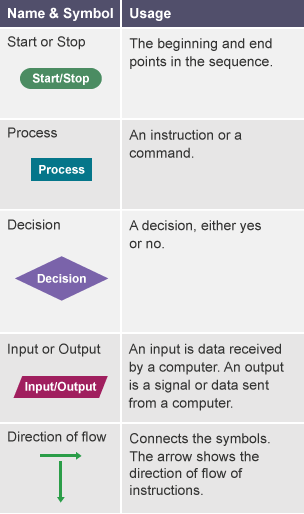
Flowcharts make branching structure visible. The five shapes:
| Shape | Name | Use |
|---|---|---|
| Oval | Terminal (Mulai/Selesai) | Start and end |
| Rectangle | Process (Proses) | An action |
| Diamond | Decision (Keputusan) | A yes/no branch |
| Parallelogram | Input/Output (Jajar Genjang) | Data in or out |
| Arrow | Flow line (Panah) | Direction |
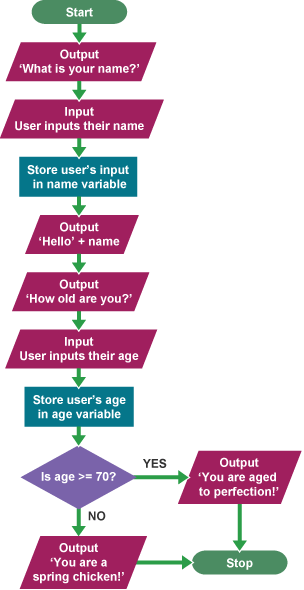
The name/age example works as a reference because it is small enough to hold in your head but large enough to contain all the moving parts: input, storage, a conditional branch, and two different outputs depending on the path taken. Understanding why the algorithm has exactly this structure is more useful than memorizing it.
The Sphero sources ground this in observable reality. Traffic light algorithms do not cycle blindly — they run road sensors through a decision algorithm that minimizes wait time across all lanes. Bus scheduling is the Traveling Salesman Problem, a classic hard problem in computer science where algorithms automate a calculation that is impossible to do manually at scale. These are not toys. They are the same type of logic you will build, just at a simpler scale.
Closing the Loop: Evaluation
The six ADA curriculum sections stop at algorithmic thinking, but the CT process is not finished there. Evaluation is what happens after you write the algorithm and before you write the code.
A valid algorithm must pass four tests: it is fully understood, it is complete, it is efficient, and it meets the original design criteria. The BBC identifies four ways solutions fail — each maps to one of the four tests. The most useful evaluation technique is the dry run: trace the algorithm by hand with representative inputs and check that every path produces the correct output before committing to code.
The name/age algorithm is the BBC's own dry-run example. Try age 15 and age 75. Does each take the correct branch? Does each produce the correct message? If yes, the algorithm is valid. If not, fixing it on paper costs minutes; fixing it in code costs hours.
Evaluation is not a separate discipline from CT — it is the verification pass that closes the CT loop. Design → build → check → iterate. Skipping evaluation does not save time; it defers the cost to the stage where it is most expensive to fix.
The CT Loop
The loop is not always linear. A dry-run failure sends you back to decomposition or abstraction, not always to the beginning. The diagram shows the common path; judgment decides where to re-enter.
A Practice Model for ADA Prep
The six sections compose into one workable drill:
- Decompose any task you are given into sub-tasks before starting. Write the list explicitly, not mentally.
- Scan for patterns before solving sub-tasks. Which pieces are structurally the same as something you've done before? Apply the existing solution. Solve fresh only where there is no pattern.
- Abstract each sub-problem before writing a solution. What details are irrelevant? What does the solution need to handle in general, not just for this specific case?
- Write the algorithm in pseudocode or as a flowchart. Name every step. Include every branch.
- Translate conditional statements you encounter or write. When you say "a user can access this feature only if they're logged in," diagram it: logged-in-access → logged-in. If you're not logged in (¬logged-in), you cannot have logged-in access (¬logged-in-access). The arrow direction matters for the code that follows.
- Dry-run the algorithm before writing code. Pick two or three representative inputs. Trace the path. Check the output.
That loop is what the Academy's project-based environment will exercise constantly. Getting it as a habit before you arrive is what "being prepared" actually means in this section.
Connections
- computational-thinking
- decomposition
- pattern-recognition
- abstraction
- algorithm
- sufficient-and-necessary-conditions
- evaluation
- apple-developer-academy-prep-learning-and-thinking — CT as one layer of the broader problem-solving and learning stance
- apple-developer-academy-prep-digital-literacy — CT's role inside the wider Digital Literacy cluster
- diagnosis-before-solution — problem framing precedes CT; CT builds the solution once the right problem is identified
Sources
- computational-thinking-introduction
- computational-thinking-tech-tip
- what-is-computational-thinking-bbc-bitesize
- understanding-abstraction-everyday-examples
- what-is-abstraction-bbc-bitesize
- what-is-decomposition-bbc-bitesize
- what-is-pattern-recognition-bbc-bitesize
- pattern-recognition-qcaa-video
- if-x-then-y-sufficiency-and-necessity-khan-academy
- a-quick-guide-to-conditional-logic-khan-academy
- conditional-reasoning-and-logical-equivalence-khan-academy
- the-logic-of-if-vs-only-if-khan-academy
- what-is-an-algorithm-bbc-bitesize
- 6-examples-of-algorithms-in-everyday-life
- what-is-evaluation-bbc-bitesize